TikTok Ads MCP Server
Connect TikTok Ads and ask your AI tool which videos keep people watching past the first two seconds, which ones end in a complete payment, and how much of each result came from a view rather than a click. It reads campaigns, ad groups, ads and each video's quartile views, so you stop rebuilding the same custom report in TikTok Ads Manager every Monday.
- No credit card required
- Set up in 2 minutes
- Read-only access






Set Up the Two Minute Reports Tiktok Ads MCP in 3 Simple Steps
Add Two Minute Reports to your AI tool once, then ask about your Tiktok Ads whenever you need an answer.
Create Your Free Account
Add Two Minute Reports to Your AI Tool
Start Asking Questions
Which Videos Hold Viewers Past Two Seconds and Still Sell? A TikTok Ads MCP Example
One prompt that checks opening hooks, worn-out creatives, view-through credit, Pangle placement and age groups over the last 14 days.
 Tiktok Ads
Look at my TikTok Ads for the last 14 days. Which videos keep people past 2 seconds but rarely lead to a purchase, which ads are wearing out, how many purchases are view-through, is Pangle eating budget, and which age group should get more spend?
| Area | What I found | Action |
|---|---|---|
| Opening hooks | Problem-first openers keep 41% of viewers past 2 seconds, logo intros only 23% | Brief new hooks |
| Creative fatigue | Top UGC video: frequency up to 3.8, CTR down from 1.4% to 0.8% in 9 days | Rotate creative |
| View-through credit | 62% of purchases are view-through; click-through CPA is $48, not the $29 shown | Report both |
| Pangle | Pangle took 27% of spend but drove 4% of complete payments | Exclude Pangle |
| Age groups | 18 to 24 gets 55% of 6-second views; 25 to 34 converts at 2.1x the rate | Shift budget |
Weekly creative note: Complete payment ROAS held at 2.4x while spend rose 18%. Two new hook variants go live Monday, and the Pangle exclusion should free about $1,900 a week for the 25 to 34 ad group.
Illustrative example
Quartile Views, Pixel Events and SKAN Installs: What Two Minute Reports Reads in TikTok Ads
The Two Minute Reports connector covers more than 460 TikTok Ads fields across account, campaign, ad group, ad and video, from spend and watch time to pixel, in-app, SKAN, offline and GMV campaign results.
Spend and delivery
Amount spent, impressions, gross impressions, reach, frequency, clicks, CTR, CPC, CPM and cost per 1,000 people reached.
Video and watch time
Video views, 2-second and 6-second video views, views at 25%, 50%, 75% and 100%, average watch time per view and per person, and focused views at 6 and 15 seconds.
Engagement and LIVE
Total engagement, engagement rate, profile visits, paid likes, comments, shares and follows, duet, stitch and sound usage clicks, LIVE views and LIVE product clicks.
Pixel and onsite events
Complete payment and complete payment ROAS, initiate checkout, add to cart, product details page views, form submissions, landing page views, plus view-through (VTA) and click-through (CTA) conversions.
App events and SKAN
App installs, real time app installs, registrations, purchases, day 2 retention, start trial and subscribe events, with SKAN versions of each for iOS campaigns.
Audience, placement and settings
Age, gender, country, region, DMA, language, device platform, placement and interest category, plus campaign objective, optimization goal and bidding strategy. GMV campaign orders and gross revenue are here too.
Run a Full TikTok Ads Audit With Claude
TikTok Ads move fast, and creative fatigue sets in faster. What won last week can quietly drain your budget this week. Connect TikTok Ads to Claude through Two Minute Reports, run the audit, and get a prioritized plan on what to fix first.
Built to Run Campaigns or to Report on Them: TikTok Ads MCP Servers Compared
TikTok for Business runs its own MCP server, announced at TikTok World in May 2026, with about 400 tools for creating campaigns, changing budgets and targeting, and pulling reports. Community projects on GitHub mostly read campaign and report data, and they ask you to register your own TikTok developer app.
| Feature | TikTok for Business MCP Server | Open-source servers | Two Minute Reports |
|---|---|---|---|
| Built for | Agents that create campaigns, adjust bids and budgets, and pull reports | Reading campaigns and reports, depending on the project | Reporting and analysis across your TikTok Ads accounts |
| Getting started | Point an MCP-compatible agent at a TikTok-hosted endpoint | Register a TikTok developer app, store tokens and run the server yourself | Hosted: sign in with OAuth and add one URL |
| Changes to campaigns | Yes, including new campaigns, budget changes and pausing ad groups | Mostly none; writes appear on some roadmaps | None, it stays read-only on the ad account |
| Data beyond TikTok | TikTok Ads only | TikTok Ads only | TikTok Ads plus 30+ other sources in one workspace |
| Client accounts | Not described in TikTok's docs | Varies by project | All client accounts in one workspace |
| Client reporting | Not part of the server | Not included | Dashboards and scheduled white-label reports |
| Price | Not stated by TikTok | Free under the MIT license, you host it | Included in every Two Minute Reports plan |
Your Data Is Safe
Security you can explain to your clients, too.
We don't store your advertising data on our servers. Two Minute Reports connects to your data sources using OAuth - your credentials never touch our system. Your AI only reads what you've explicitly connected.
OAuth Authentication
Connects securely to your data sources. No passwords stored. Revoke access anytime from your platform settings.
Read-Only Access
Your AI can only read your data. It cannot create, edit, pause, or delete anything. Your account stays fully in your control.
No Data Training
Your advertising data is never used to train AI models. What's yours stays yours - full stop.
More Two Minute Reports MCP Servers You Can Connect Today
The same server URL works for every data source in your Two Minute Reports account.



Frequently Asked Questions
Yes. TikTok does not report hook rate as its own metric, but your AI can divide 2-second video views by impressions for each ad. It can do the same with 6-second views or 100% views to see where people drop off. Every video field you can use for this is listed under TikTok Ads metrics and dimensions.
Yes. There is a separate SKAN group with results, conversions, app installs, registrations, purchases and purchase value, among others. Ask your AI to put SKAN installs next to the regular in-app install count for the same iOS campaign, so you can see how far the two numbers drift apart before you judge a campaign.
It can track frequency, CTR and average watch time per video view by day for each ad and flag the ones that slide while frequency climbs. For a full checklist, the TikTok Ads audit skill for Claude scores creative fatigue and lists fixes in order. This guide explains how skills run.
Yes. Age, gender, country, region, DMA, language, device platform and interest category are all available. A useful question is which age group gets the cheapest 6-second views and which one actually completes payments, because the two are not always the same group.
TikTok for Business runs a server with about 400 tools for agents that build campaigns, change budgets and targeting, and pause ad groups. Use it when you want an agent to make changes. Two Minute Reports is for reporting: it puts TikTok next to sources like Shopify and GA4, and feeds your client dashboards.
Yes. The connector reads VTA and CTA conversions, registrations and purchases as separate fields. Ask what share of last month's purchases came from people who only watched, then compare CPA on clicks alone. Showing both helps when a client asks why GA4 credits TikTok with fewer sales than TikTok Ads Manager does.
Yes. Placement is one of the audience dimensions, and ad group placement settings are available too. Ask for spend, complete payments and CTR split by placement. If Pangle takes a large share of spend with few purchases, you know which ad groups to switch to TikTok placement only.
Yes. GMV campaign fields include orders, cost per order, gross revenue, ROI and net cost. LIVE fields cover LIVE views, unique views, effective LIVE views and LIVE product clicks. That lets you compare LIVE product clicks with GMV campaign orders for the same dates, next to your regular campaigns.
Yes. You get paid likes, comments, shares and follows, plus profile visits, profile visit rate and engagement rate. These help when a campaign's goal is community growth rather than sales. To see how the same questions work for Meta, look at the Facebook Ads MCP page.
Recommended Reads
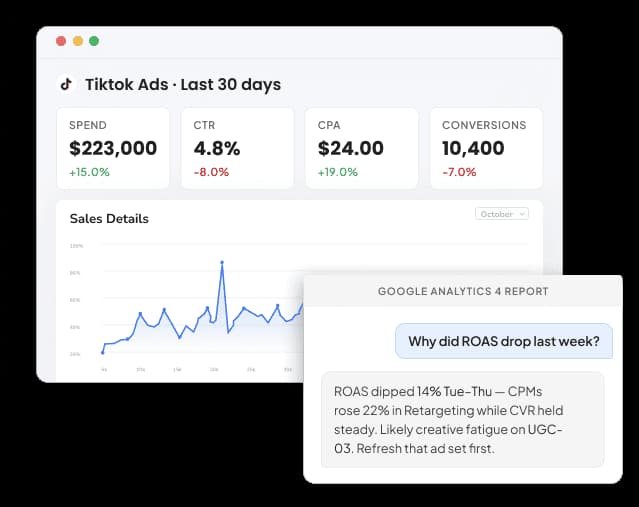
TikTok Ads Reporting Connector
Connect TikTok Ads to Google Data Studio : Free Templates (2026)

Take back your time. Wow clients.
Get Two Minute Reports.
Start your free trial todayBuilt by marketers. Built for marketers.