Shopify MCP Server
Connect Shopify and ask your AI tool why net sales trail gross sales, which variants get sent back most, and whether first-time buyers come back for a second order. It reads orders, line items, refunds, discount codes and first and last visit UTMs, so you can skip exporting another orders CSV.
- No credit card required
- Set up in 2 minutes
- Read-only access






Set Up the Two Minute Reports Shopify MCP in 3 Simple Steps
Add Two Minute Reports to your AI tool once, then ask about your Shopify whenever you need an answer.
Create Your Free Account
Add Two Minute Reports to Your AI Tool
Start Asking Questions
What the Shopify MCP Finds When Net Sales Lag Behind Gross Sales
One prompt that covers refunds, discount codes, repeat customers, UTM sources and low stock on your best-margin SKUs, with a reply you could forward to the store owner.
 Shopify
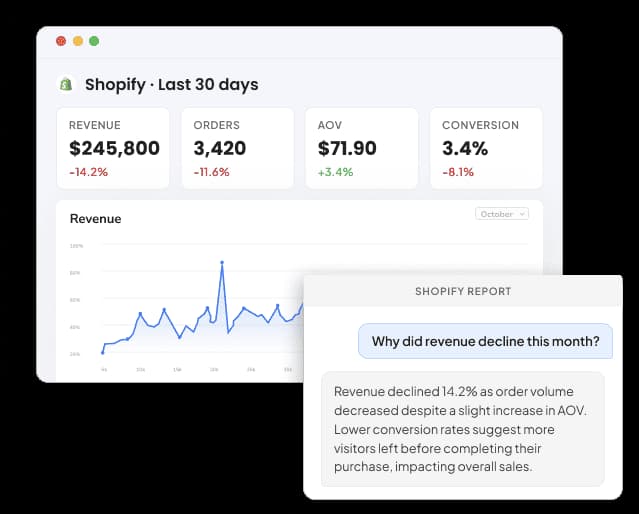
Compare October with September in my Shopify store. Which variants lost most to refunds, did discount codes cut AOV, did returning customers order less, which UTM sources brought first orders, and which high-margin SKUs are nearly gone?
| Area | What I found | Action |
|---|---|---|
| Refunds | Two sweater variants make up 41% of the $8,900 refunded | Add size guide |
| Discount codes | WELCOME15 was on 31% of orders, with AOV $18 lower | Cap the code |
| Repeat buyers | Returning customers placed 38% of orders, down from 44% | Plan win-back email |
| Attribution | First visit credits Instagram with 590 orders, last visit with 412 | Compare UTM models |
| Inventory | Three SKUs at a 52% gross margin have under 20 units left | Reorder this week |
Store owner summary: Gross sales grew 9%, but refunds on two sweater variants and a heavily used WELCOME15 code held net sales growth to 3%. Start with the size guide and a cap on the code before the holiday sale.
Illustrative example
Two Minute Reports Tracks Every Shopify Order From First Visit to Refund
The connector reads 161 Shopify fields, from order and line item details to payments, inventory and the UTMs on each customer's first and last visit.
Sales and margin
Total sales, gross sales, discount amount, refund amount, net sales, shipping, tax, tips, duties, gross profit, gross margin and cost of goods sold.
Orders and fulfillment
Orders, average order value, ordered, returned and net quantity, order tags, payment status, fulfillment status, discount code, sales channel, POS location name and cancelled orders.
Products and variants
Product title, variant title, variant SKU, product type, vendor, category, tags, status, price, comparison price and cost per item, plus line item name, price and SKU.
Customers
Customer count, new customers, returning customers, customer order count, customer average order amount, customer tags, account age in days, last order date, country and city.
First and last visit
Source, source type, referrer URL, landing page URL, referral code and UTM source, medium, campaign, content and term, for both the first visit and the visit that converted.
Payments and inventory
Gross, refunded and net payments, transactions, transaction kind, payment method, accelerated checkout, inventory quantity and inventory value.
Shopify's Developer and Shopping Servers Versus a Shopify MCP Built for Store Reporting
Shopify's own MCP servers serve developers and shoppers: Dev MCP answers questions about its APIs and docs, while the UCP and Customer Accounts servers handle catalog search, carts and a signed-in shopper's own orders. Community servers such as shopify-mcp on npm call the Admin API with your app credentials and can change products and orders.
| Feature | Shopify's MCP servers | Open-source servers | Two Minute Reports |
|---|---|---|---|
| Who maintains it | Shopify (Dev MCP is open source under MIT, part of the Shopify AI Toolkit) | Independent developers | Two Minute Reports, hosted for you |
| What it is built for | Dev MCP: docs, GraphQL schema and code checks. UCP and Customer Accounts: catalog, carts and a shopper's own orders | Reading and editing products, orders, customers and inventory through the Admin API | Store reporting on sales, orders, customers and attribution |
| Sales reports for the merchant | Not included | Raw order records your AI has to total itself | Net sales, AOV, gross margin and new vs returning customers as ready metrics |
| What you need | Dev MCP runs locally with npx; Customer Accounts needs OAuth with PKCE and a custom domain | Admin API credentials from your own app and a place to run it | OAuth sign-in and one URL |
| Access to your store | Dev MCP does not touch store data | Often read and write, depending on the scopes you grant | Read-only on your Shopify store |
| Other data sources | Shopify only | Usually Shopify only | Shopify plus 30+ other sources, with all client stores in one workspace |
| Dashboards and client reports | Not included | Not included | Dashboards and scheduled white-label reports, included in every TMR plan |
Your Data Is Safe
Security you can explain to your clients, too.
We don't store your advertising data on our servers. Two Minute Reports connects to your data sources using OAuth - your credentials never touch our system. Your AI only reads what you've explicitly connected.
OAuth Authentication
Connects securely to your data sources. No passwords stored. Revoke access anytime from your platform settings.
Read-Only Access
Your AI can only read your data. It cannot create, edit, pause, or delete anything. Your account stays fully in your control.
No Data Training
Your advertising data is never used to train AI models. What's yours stays yours - full stop.
More Two Minute Reports MCP Servers You Can Connect Today
The same server URL works for every data source in your Two Minute Reports account.



Frequently Asked Questions
Yes. Refund amount sits next to gross sales, discounts and net sales, and returned quantity sits next to ordered and net quantity. Group them by product title, variant title or variant SKU to see which sizes or colors come back most. For exact field names, check the full list of Shopify metrics and dimensions.
Ask for orders, average order value and discount amount grouped by discount code, then compare them with orders that used no code. A code that shows up on many orders but pulls AOV down may be worth capping or limiting to first orders. Order tags help you split influencer or wholesale codes from public ones.
Yes. The channel dimension separates orders by sales channel, and POS location name and location name show which shop handled each order. Ask for net sales and orders by channel and location to see how your retail stores compare with the online store over the same weeks.
Dev MCP helps developers search Shopify docs, explore the GraphQL schema and check code, without touching store data. The UCP and Customer Accounts servers let shopping assistants search a catalog, build carts and show a signed-in shopper their own orders. None returns merchant sales reports. To use Dev MCP next to ours, see Two Minute Reports in Claude Code.
Partly. Inventory quantity and inventory value show what is on hand, and ordered quantity by variant SKU and date shows how fast each one sells. Ask your AI to divide stock by average daily units sold over the last 30 days. Seasonal swings are not factored in, so treat the result as an estimate.
Yes. Each order carries first visit (FV) and last visit (LV) fields: source, source type, referrer URL, landing page URL, referral code and all five UTM tags. Ask for orders grouped by FV: UTM campaign, then by LV: UTM campaign. The gap shows which campaigns start journeys and which ones finish them.
Yes. Gross profit, gross margin and cost of goods sold are available, along with cost per item, product vendor and product type. Ask for gross margin by vendor for the last quarter. Cost per item comes from your product records, so variants with no cost entered will make margins look higher than they are.
Yes. New customers, returning customers, customer order count and customer average order amount are metrics, and Is Returning customer, account age in days and last order date help you build segments. Ask which first visit UTM source brings buyers who place a second order within 90 days.
Yes, if Facebook Ads is connected in the same workspace. Shopify holds no ad spend, so your AI takes spend from the Facebook Ads MCP and orders from Shopify where the last visit UTM source matches your Meta tags. To review the ad side in depth, run the Meta Ads audit Claude Skill.
Recommended Reads
Shopify Ecommerce Reporting Connector

13 Key Shopify Metrics Every Ecommerce Marketer Should Track
Take back your time. Wow clients.
Get Two Minute Reports.
Start your free trial todayBuilt by marketers. Built for marketers.