Amazon Ads MCP Server
Connect Amazon Ads to your AI tool and ask which search terms deserve their own exact match keyword, which ASINs run a high ACOS and how much ad revenue came from products you never advertised. It reads Sponsored Products, Sponsored Brands and Sponsored Display data for seller and vendor accounts.
- No credit card required
- Set up in 2 minutes
- Read-only access







Set Up the Two Minute Reports Amazon Ads MCP in 3 Simple Steps
Add Two Minute Reports to your AI tool once, then ask about your Amazon Ads whenever you need an answer.
Create Your Free Account
Add Two Minute Reports to Your AI Tool
Start Asking Questions
Harvesting Search Terms and Trimming ACOS by ASIN With the Amazon Ads MCP
One question about the last 30 days of Sponsored Products, checked by search term, ASIN, placement and other SKU sales.
 Amazon Ads
Look at last month's Sponsored Products: which search terms should become exact match keywords or negatives, which ASINs are above 40% ACOS, and is top of search worth its bid?
| Area | What I found | Action |
|---|---|---|
| Search terms | 14 auto campaign search terms converted 3 or more times but are not exact match keywords yet | Add as exact |
| Negatives | 22 search terms spent $310 with zero orders in 30 days | Add negatives |
| ASIN ACOS | 2 ASINs take 38% of spend at 52% ACOS, against a 24% account average | Lower bids |
| Placement | Top of search converts at 14% versus 6% on product pages | Raise placement bid |
| Other SKU sales | 31% of Sponsored Brands sales came from other SKUs, not the advertised ASIN | Report separately |
Client summary: Moving 14 proven search terms into exact match and blocking 22 wasted ones should bring ACOS down without losing orders. The two expensive ASINs get lower bids while top of search gets a bigger push.
Illustrative example
Halo Sales, Attribution Windows and Placements: The Amazon Ads Data in Two Minute Reports
The Two Minute Reports Amazon Ads connector covers Sponsored Products, Sponsored Brands and Sponsored Display for seller and vendor accounts, down to the keyword, search term, targeting expression and advertised ASIN.
Spend and traffic
Impressions, view impressions, clicks, amount spent, CPC, CTR, conversion rate (CVR), ACOS and return on ad spend.
Attribution windows
ACOS, ROAS, CVR, total orders and total sales at 1, 7, 14 and 30 days, plus 14 day view-attributed versions of each.
Same SKU and other SKU
Total ad orders and total ad sales split into same SKU and other SKU at 1, 7, 14 and 30 days, so halo sales show up on their own.
Advertised products
Advertised ASIN, advertised SKU, product title, brand, category, price, best seller rank, product availability and product image URL.
Keywords, targets and search terms
Keyword, keyword type, keyword status and keyword bid, targeting expression, target ID, targeting type, search term and placement.
Accounts, portfolios and campaigns
Profile currency, country code and timezone, account type, marketplace, portfolio, campaign bid strategy, budget, budget type, targeting type, delivery status, ad group bid optimization and ad type.
Amazon Ads Has an Official MCP Server in Open Beta: How It Differs From Two Minute Reports
Amazon Ads moved its own MCP server to open beta on February 2, 2026, for partners with active Amazon Ads API credentials, and it can create, update and delete campaigns. Community projects such as amazon-ads-mcp, maintained by Openbridge, also wrap the Ads API, but you host them yourself.
| Feature | Amazon Ads MCP Server (open beta) | Open-source servers | Two Minute Reports |
|---|---|---|---|
| Built for | AI agents that run campaign, reporting and account work through the Ads API | Developers who want Ads API tools on their own server | Reporting and analysis across your Amazon Ads accounts |
| Getting access | Amazon Ads partners with active API credentials | Your own Ads API app or a managed login, plus hosting, for example with Docker | Hosted: sign in with OAuth and add one URL |
| Changes to campaigns | Creates, updates and deletes campaigns; a pre-built tool builds a full Sponsored Products campaign | Varies; amazon-ads-mcp includes tools to create campaigns and update bids | None, it stays read-only on the ad account |
| Data beyond Amazon Ads | Amazon Ads API only, including billing data | Amazon Ads API only | Amazon Ads plus 30+ other sources in one workspace |
| Client accounts | Accounts your partner API credentials can reach | Accounts tied to the API app you connect | All client accounts in one workspace |
| Client reporting | Report generation through the API; client output is up to you | Not included | Dashboards and scheduled white-label reports |
Your Data Is Safe
Security you can explain to your clients, too.
We don't store your advertising data on our servers. Two Minute Reports connects to your data sources using OAuth - your credentials never touch our system. Your AI only reads what you've explicitly connected.
OAuth Authentication
Connects securely to your data sources. No passwords stored. Revoke access anytime from your platform settings.
Read-Only Access
Your AI can only read your data. It cannot create, edit, pause, or delete anything. Your account stays fully in your control.
No Data Training
Your advertising data is never used to train AI models. What's yours stays yours - full stop.
More Two Minute Reports MCP Servers You Can Connect Today
The same server URL works for every data source in your Two Minute Reports account.



Frequently Asked Questions
Yes. The search term field sits next to keyword, keyword type and targeting expression, so your AI can list terms from auto or broad campaigns that already convert but are not keywords yet. It can also flag terms with clicks and no orders as negative candidates. Our guide to auditing Amazon Ads with Claude has prompts for this.
Yes. ACOS, ROAS, CVR, orders and sales each come in 1, 7, 14 and 30 day versions, plus a 14 day view-attributed version. Ask your AI to compare windows when a campaign looks weak at 7 days, because products that shoppers think about for longer may pick up orders later. Pick one window for client reports so the numbers stay consistent month to month.
Yes. The placement field breaks clicks, spend, orders and ACOS out by where the ad showed. Use it to judge whether a top of search bid adjustment earns its keep, or whether product pages bring cheaper orders. The full list of Amazon Ads metrics and dimensions shows every field you can group results by.
Yes. Seller and vendor accounts both connect, and the account type field tells them apart in answers. Each profile also carries its currency code, country code and marketplace, so a brand selling in the US, UK and Germany can compare marketplaces without adding up sales in different currencies by mistake.
Use ROAS when you compare channels. ACOS is spend divided by sales, so ROAS is simply one divided by ACOS, and your AI can convert it in the same answer. See what the Google Ads MCP reads for Shopping campaigns. For ready-made audit flows on other ad platforms, browse the PPC Claude Skills.
Ask for other SKU sales. Two Minute Reports splits total ad orders and total ad sales into same SKU and other SKU at 1, 7, 14 and 30 days. Same SKU is the ASIN in the ad. Other SKU is a different product of yours bought after the click. A large other SKU share tells you an ad is selling more of the catalog than its ACOS suggests.
Product availability is one of the advertised product fields, along with best seller rank, price, brand and category. Your AI can line up spend against availability and point out ASINs that kept getting clicks while the listing had a stock problem. Spend on an unavailable listing is easy to miss when you only look at campaign totals, so ask for it by ASIN.
Yes. Portfolio name, ID and status are included, along with campaign budget, budget type and bid strategy. Agencies that group a client's campaigns into portfolios by brand or product line can ask for spend, sales and ACOS per portfolio, then see which campaigns inside each portfolio use the most budget.
Amazon's server, in open beta since February 2, 2026, is for Amazon Ads partners with active API credentials. It can create, update and delete campaigns, manage account settings and reach billing data. Two Minute Reports is built for reporting instead: it reads your Amazon Ads results next to your other channels and leaves campaign changes to you.
Keep each prompt to one decision: search terms to harvest, ASINs above your target ACOS, placements to re-bid or portfolios running hot. Name the attribution window and the date range every time. If you work in Claude, the Claude page in our knowledge base explains how the Two Minute Reports connector and skills fit together there.
Recommended Reads
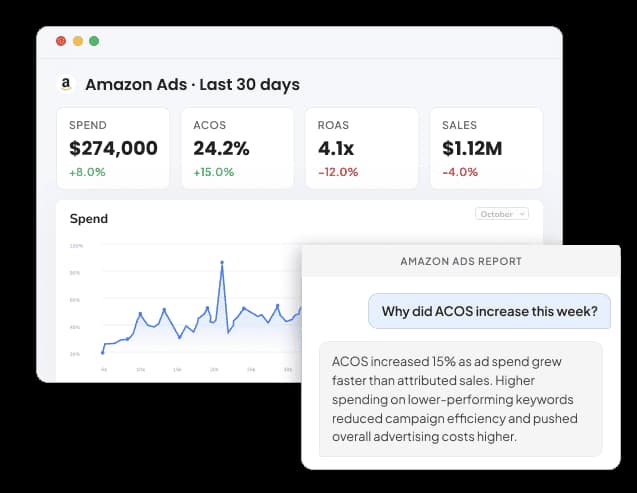
Amazon Ads Reporting Connector

Connect Amazon Ads to Google Data Studio: A Complete Guide with Free Templates
Take back your time. Wow clients.
Get Two Minute Reports.
Start your free trial todayBuilt by marketers. Built for marketers.