10+ Best Shopify Apps for Ecommerce Brands (2026)

Summarize this blog post with:
Choosing the right Shopify apps can directly impact how fast your store grows in 2026. From improving conversions and customer retention to optimizing site performance and tracking store analytics, the apps you install play a critical role in day-to-day operations and long-term scalability.
While Shopify offers strong built-in features, most successful stores rely on third-party apps to fill functional gaps and unlock better insights. This curated list of the best Shopify apps for 2026 highlights tools that consistently help merchants sell more, work efficiently, and clearly understand their store performance.
Shopify businesses actively use each app listed below and focus on a specific growth lever, without overlapping or competing with your core reporting stack.
How to choose the right Shopify apps for your store
The Shopify App Store offers thousands of tools, but not every app is right for every store. Choosing the best Shopify apps starts with understanding what your business actually needs.
- Start by identifying your bottlenecks. If conversions are low, focus on CRO or page-building apps. If data is scattered across platforms, prioritize reporting and analytics tools that bring everything together.
- Make sure the app integrates smoothly with Shopify and your existing tools. Poor integrations often lead to manual work, data gaps, and inconsistent reporting.
- Pay close attention to performance. Lightweight, well-reviewed apps are less likely to slow down your store or affect checkout speed.
- Finally, choose apps that can scale with your business. Tools with automation, flexible pricing, and multi-store support will continue to add value as your store grows.
Top 10 best Shopify apps for ecommerce brands
1. Two Minute Reports


Why you need it:
Shopify’s built-in reports are useful, but they often fall short when you need a clearer view of trends, performance over time, or automated reporting. Two Minute Reports helps you turn your Shopify data into simple, shareable reports without manual exports.
Best for:
Agencies, marketers, store owners, and data teams who want clear performance visibility without spending time building reports.
Features:
Shopify data integration: Automatically pulls key Shopify metrics such as revenue, orders, average order value, refunds, and customer data, giving you a complete view of store performance in one place.
Fast, automated Shopify reporting: Forget manual exports. Two Minute Reports refreshes your Shopify dashboards in less than five seconds, so your team always works with the latest data.
Connect 30+ marketing and analytics tools: Blend Shopify data with paid ads, email, SEO, and analytics platforms directly in Google Sheets or Google Data Studio — no complex setup required.
Flexible, goal-driven dashboards: Customize reports to track what matters most to your store, from sales performance and ROAS to retention and customer behavior.
Automated sharing and scheduling: Send recurring Shopify reports to stakeholders or share live dashboards, ensuring everyone stays aligned without constant follow-ups.
White-label Shopify reports: Add your logo, brand colors, and custom domains to deliver professional reports that look like they were built in-house.
Ready-to-use Shopify templates: Start quickly with pre-built dashboards designed for Shopify stores, agencies, and ecommerce teams, and tailor them to your workflow.
Enterprise-grade data security: Keep your Shopify and marketing data protected with strong encryption, controlled access, and compliance-focused security standards.
Real-time performance alerts: Get notified when key Shopify KPIs cross predefined thresholds, helping you spot issues or opportunities before they impact revenue.
Simplified multi-store and client management: Manage multiple Shopify stores, clients, or teams from one dashboard, making reporting easier for agencies and growing brands.
Error-free, fast reporting: Get accurate, up-to-date reports without data loading issues, even when working with large datasets.
Completely no-code setup: Get started without technical expertise. No scripts, queries, or developer support needed.
What it helps with:
- Automated Shopify reports
- Custom dashboards for sales and store KPIs
- Scheduled reports for easy sharing
2. Getgabs
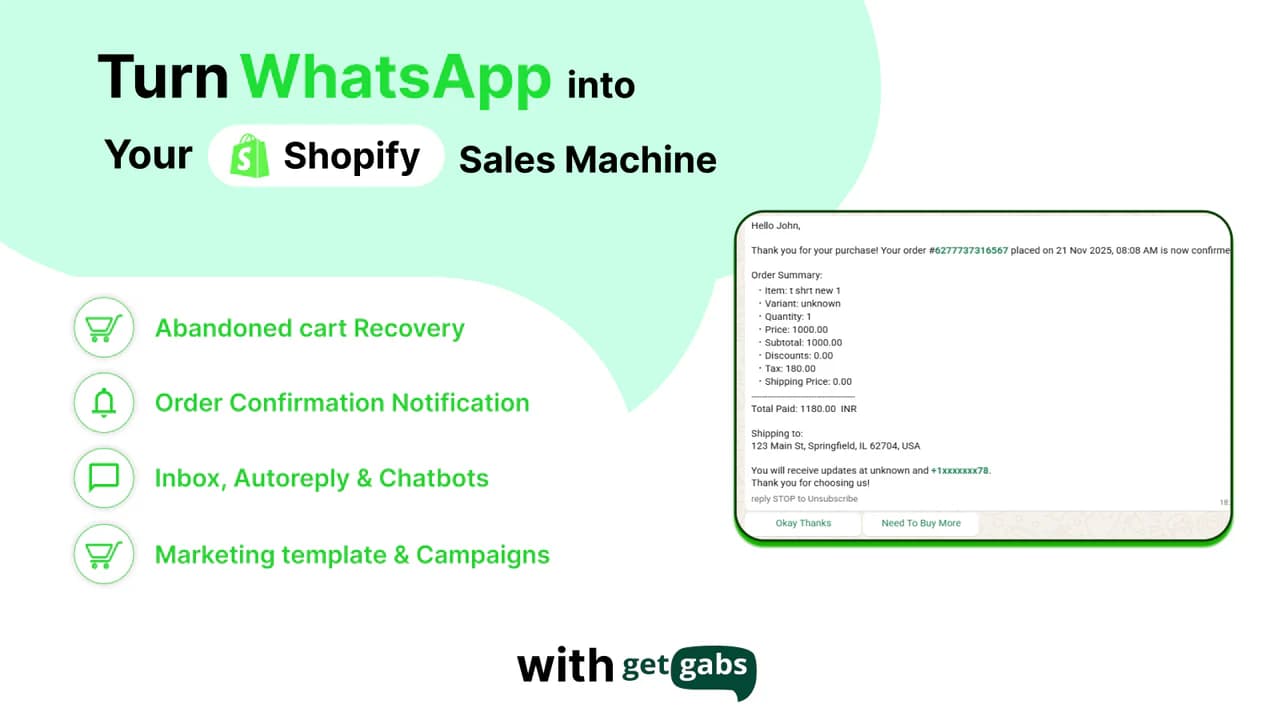
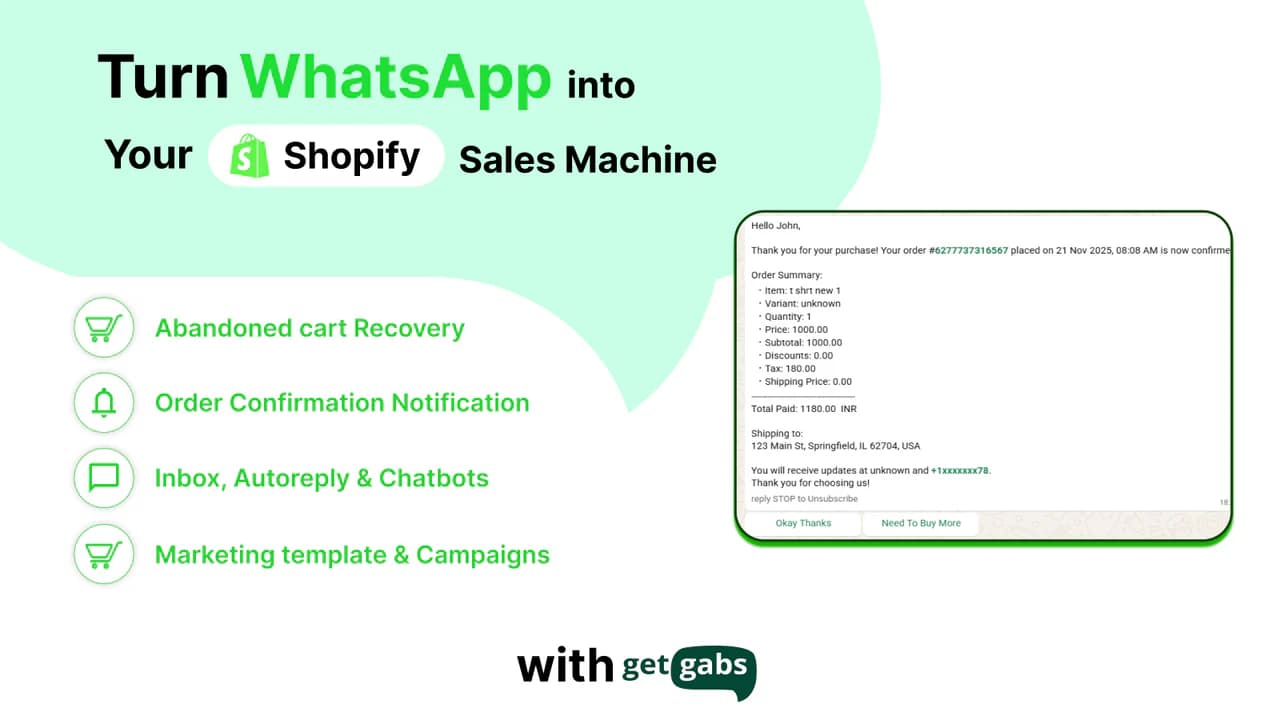
Why you need it:
Getgabs is a WhatsApp app for Shopify businesses looking to automate customer engagement and increase sales. With official WhatsApp Business API integration, it enables businesses to recover abandoned carts, send order updates, and run personalized campaigns, turning WhatsApp into a powerful revenue channel.
Best for:
E-commerce brands that want to boost conversions, automate customer communication, and leverage WhatsApp for marketing, sales, and support.
Features:
- WhatsApp abandoned cart recovery: Automatically sends reminders to customers who leave items in their cart, helping bring them back to complete purchases.
- Broadcast campaigns on WhatsApp: Promote products, offers, and updates directly to customers with targeted messaging.
- Real-time customer communication: Engage with customers instantly through WhatsApp for faster responses and better support.
- Order notifications: Send order confirmations, shipping updates, and COD verification messages without delays.
- Automation with workflows: Use chatbots and automated flows to handle repetitive conversations and improve efficiency.
- Shopify catalog integration: Sync your product catalog and share items easily with customers on WhatsApp.
- Shared team inbox: Manage all customer chats from one place, making it easier for teams to collaborate.
- Performance tracking: Monitor campaign results and customer interactions to understand what’s working.
What it helps with:
- Recovering more abandoned carts through high-engagement WhatsApp messaging
- Increasing response rates compared to traditional email channels
- Enabling real-time conversations that speed up purchase decisions
- Reducing manual effort with automated customer communication
3. EmailWish
Why you need it:
EmailWish is an all-in-one email marketing app for Shopify stores that sets up all the email flows for an e-commerce brand without requiring you to write any emails. Each flow is tailored to the brand, using its brand images, language, and style. It also has reviews, chat, wishlists, popups, and forms built in, so you don't have to set up your email flows across multiple apps. You won't need a separate app for review request emails, back-in-stock notifications, popups, forms, or other customer engagement features. It supports over 10 languages.
Best for:
EmailWish is best for Shopify and WooCommerce e-commerce stores that want effortless, done-for-you email marketing automation and an all-in-one platform for popups, reviews, live chat, wishlists, and customer engagement.
Key features:
- Very detailed and modern flow and email builder
- Done-for-you email automations
- Abandoned cart, welcome, post-purchase, review, win-back, and other automated flows
- Email campaigns and newsletters that can be created without writing anything, while still giving you the freedom to create your own
- Popups and forms for lead capture
- Product reviews and review automation
- Live chat and chatbot
- Wishlist and back-in-stock email notifications
- Mature customer segmentation and targeting
- Analytics and campaign reporting
- Shopify-focused customer and order data integration
What it helps with:
- Automated email marketing and customer communication
- Abandoned cart recovery and repeat purchases
- Lead generation through popups and forms
- Customer segmentation, personalized campaigns, and performance tracking
4. STOQ
Why you need STOQ:
Capture demand even before products are available, or inventory is out of stock. STOQ helps Shopify merchants set up preorders, automate back-in-stock alerts & evaluate demand signals for unavailable inventory. It is the most loved preorder app and trusted by more than 40,000 merchants worldwide.
Best for:
Shopify brands managing product launches, preorders, made-to-order products or frequently sold-out products and looking to evaluate product demand
Features:
- Partial payments and fulfilment management: Collect partial payments for preorders and manage fulfilment as orders move through production.
- Multi-market and multi-language support: Manage preorders across different markets and languages with Shopify Markets support.
- Automated back-in-stock alerts and waitlists: Let customers register their interest in unavailable products and receive notifications when they’re available again.
- Variant-level controls: Configure preorders and back-in-stock alerts for individual product variants.
- Full-funnel analytics: Track customer engagement and conversions across preorders and back-in-stock alerts.
What it helps with:
- Capturing sales through preorders and automated back-in-stock alerts (even when products are out of stock)
- Gauging product demand through waitlists and customer interest
- Securing deposits with partial payments
- Managing product launches and preorder fulfilment efficiently
- Tracking customer engagement and conversions to make better inventory decisions
5. Insider Club
Why do you need Insider Club?
Insider Club is a community forum app for Shopify stores. It adds a forum to your store where customers ask their questions, share their photos and help each other, right next to your product pages. Each answer stays online, so the next customer with the same question finds it instead of contacting your support. Your customers already talk about your products on Instagram, in Facebook groups or on Discord. With Insider Club, these conversations happen on a site you own, and every public discussion is a page Google can index.
Best for:
Shopify brands that want to build a customer community on their own store and reduce repetitive support questions.
Features:
- Automatic membership: customers logged into your store are members right away, with no new account to create.
- Categories and private spaces: organize discussions by topic, with private categories for your VIP customers or a password-protected forum.
- Rich posts: members can add photos, video links and polls to their posts.
- Product cards: your team can show a product inside a discussion, so readers can open its page in one click.
- Roles and badges: highlight your team, your ambassadors and your most loyal customers.
- Pinned posts: keep up to three posts at the top of the forum, like your rules or a weekly Q&A.
- Email notifications: members are told when someone replies, which brings them back to your store.
- Member moderation: see each member's activity, and ban or remove a member when needed.
- Community feed section: show your latest discussions on any page of your theme.
What it helps with:
- Reducing repetitive questions to customer support
- Bringing customers back between two orders
- Collecting customer photos and feedback that reassure new buyers
- Getting new pages indexed by Google
6. DataFeedWatch
Why you need it:
DataFeedWatch is a product feed app for Shopify businesses that want to grow sales across Google Shopping, Meta, TikTok and AI-driven shopping channels. It turns your Shopify catalogue into channel-ready product feeds in one click and uses built-in AI to optimize your product data, helping you reduce disapprovals and get more out of your ad spend.
Best for:
E-commerce brands and agencies that advertise on multiple shopping channels, sell in several markets, or manage large catalogues and want accurate, optimized feeds without hours of manual work.
Features:
- 1-click feeds: Create optimized product feeds for Google Shopping, Meta, TikTok, Bing, Pinterest and many more channels in seconds.
- AI-powered optimization: Improve product titles and descriptions and fill in missing attributes like color, size and gender, included in every plan.
- Shopify Markets support: Sync local prices, currencies and availability so every market gets the right data.
- Metafields: Pull richer product data from Shopify metafields straight into your feeds.
- Custom labels and segmentation: Group products by performance or season to run smarter campaigns.
- Attribute mapping and custom rules: Fine-tune your feed with flexible rules, variant sync and error validation.
- AI shopping channels: Get your products into newer channels like ChatGPT and Perplexity Shopping.
- Expert support: Feed specialists are available on live chat to help at every step.
What it helps with:
- Reducing product disapprovals by fixing missing or incorrect feed data
- Improving ad performance with optimized titles, descriptions and custom labels
- Expanding into new markets and channels without rebuilding feeds from scratch
- Saving time on feed management, even for large catalogues or multiple stores
7. Klaviyo
Why you need it:
Email and SMS are still some of the most effective revenue channels for Ecommerce. Klaviyo makes it easier to personalize campaigns based on customer behavior and purchase data.
Best for:
Brands focused on improving retention and driving repeat purchases.
What it helps with:
- Abandoned cart and post-purchase flows
- Customer segmentation
- Email and SMS automation
8. Tiny SEO Speed Image Optimizer
Why you need it:
Page speed and SEO have a direct impact on conversions. TinyIMG helps optimize images and fix common SEO issues without needing technical expertise.
Best for:
Stores looking to improve site speed and organic visibility.
What it helps with:
- Image compression and lazy loading
- SEO audits and metadata updates
- Faster page load times
9. Omnisend
Why you need it:
Omnisend combines email and SMS marketing into one platform, making it easier to manage customer communication from a single place.
Best for:
Growing stores that want a simple, all-in-one approach to customer messaging.
What it helps with:
- Pre-built automation workflows
- Email and SMS campaigns
- Shopify-focused templates
10. Growave
Growave is a Shopify retention app designed to help merchants increase conversions, engage customers, and drive repeat purchases. It combines loyalty programs, reviews, wishlists, referrals, and Instagram shopping tools in one platform, helping Shopify brands build stronger customer relationships and grow long-term revenue.
Best for:
Shopify brands that want to increase repeat purchases, build customer loyalty, collect social proof, and improve retention with an all-in-one platform.
Features:
- Loyalty & rewards: Reward customers with points and incentives to encourage repeat purchases and increase engagement.
- VIP program: Create customizable VIP tiers to recognize loyal customers and encourage higher spending.
- Points program: Build a flexible points-based rewards system with customizable rules, multi-currency support, and performance analytics.
- Referral program: Encourage customers to refer friends and turn loyal shoppers into brand advocates.
- Product reviews & ratings: Collect and display customer reviews and user-generated content to build social proof and customer trust.
- Wishlist & gift registry: Let customers save products for later while helping recover lost sales, increase AOV, and bring shoppers back.
- Instagram Shop Gallery: Turn Instagram content and user-generated content into shoppable galleries, allowing customers to discover and shop products directly.
What it helps with:
- Increasing repeat purchases through loyalty and rewards programs
- Improving customer retention and engagement
- Building trust with product reviews and user-generated content
- Recovering potential sales through wishlists
- Increasing AOV with VIP and loyalty programs
- Generating new customers through referral marketing
11. PageFly
Why you need it:
Shopify themes can be limiting when you want more control over layout and conversions. PageFly lets you build custom pages without touching code.
Best for:
Merchants who want more flexibility in page design and landing pages.
What it helps with:
- Drag-and-drop page building
- Conversion-focused templates
- Mobile-responsive designs
12. UpPromote
Why you need it:
Affiliate and referral programs can be a reliable growth channel when managed properly. UpPromote helps you run and track these programs inside Shopify.
Best for:
Brands working with affiliates, influencers, or ambassadors.
What it helps with:
- Affiliate and referral tracking
- Commission management
- Performance reporting
13. TinyICONS
Why you need it:
Small trust signals can influence buying decisions more than you’d expect. TinyICONS lets you add clean trust badges to product pages without slowing your store down.
Best for:
Stores looking to improve product page credibility.
What it helps with:
- Trust badges and icons
- Simple customization
- Lightweight implementation
14. Alia
Why you need it:
Popups still work when they’re used thoughtfully. Alia helps you capture emails and promote offers without disrupting the shopping experience.
Best for:
Merchants focused on list growth and on-site engagement.
What it helps with:
- Exit-intent and timed popups
- Offer and discount messaging
- Conversion tracking
15. Kaching
Why you need it:
Subscriptions can create predictable revenue, but only if the experience is smooth for customers. Kaching helps you set up recurring purchases without friction.
Best for:
Stores selling subscription or repeat-purchase products.
What it helps with:
- Subscription setup and management
- Flexible billing options
- Customer self-service
16. Qikify
Why you need it:
Urgency and social proof can help nudge hesitant buyers. Qikify adds subtle conversion elements like popups and notifications to support faster decisions.
Best for:
Stores aiming to improve conversions using social proof and urgency.
What it helps with:
- Sales popups and countdowns
- Social proof notifications
- Easy setup and customization
Final thoughts
There is no single “best” Shopify app for every store. The right setup depends on your growth stage, business model, and where you want to improve, whether that’s conversions, retention, performance, or visibility.
Instead of adding more apps than you need, focus on tools that solve specific problems and then measure their impact. Pairing optimization apps with clear, reliable reporting makes it easier to understand what’s working and where to double down.
As Shopify continues to evolve in 2026, stores that grow sustainably are the ones that combine the right tools with better decision-making, not guesswork.
Frequently Asked Questions
The best Shopify apps for 2026 are tools that help stores grow efficiently without adding complexity. These typically include apps for reporting and analytics, email marketing, CRO, SEO optimization, subscriptions, and campaign management. The right mix depends on your store size, goals, and existing tech stack.
Not necessarily. You don’t need many apps, but you do need the right ones. A focused app stack that covers core needs like marketing, performance optimization, and reporting is far more effective than installing dozens of tools that overlap or slow down your store.
Start by identifying your biggest bottlenecks. If insights are scattered across platforms, prioritize reporting tools. If conversions are low, look at CRO or page-building apps. Always check Shopify compatibility, performance impact, scalability, and ease of use before installing any app.
Reporting-focused apps that centralize Shopify, marketing, and ad data help teams make faster, better decisions. Tools like Two Minute Reports allow you to build automated dashboards in Google Data Studio or Google Sheets without manual data exports.
Related Blogs





Meet the Author
Shabika VenkidachalamShabika, at her core, is a storyteller who believes even data-heavy topics can be infused with heart. At Two Minute Reports, she blends creative writing with user intent to create clear, purposeful content that is deeply human. Away from her desk, she finds inspiration in nature, where creativity flourishes without distractions.

