
Summarize this blog post with:
Most of us did not sign up to spend our days inside spreadsheets.
Yet here we are. Tracking campaigns. Updating reports. Fixing formulas. Cleaning messy exports before every meeting.
Google Sheets became the backbone of business operations. And it works.
Until the manual work takes over.
The constant exports. The repetitive formatting. The time lost to tasks that should have been automated.
The good news is this: Google Sheets does not have to stay basic.
With the right add-ons, it becomes an automated reporting engine, a workflow system, an outreach tool, and even an AI assistant.
In this guide, you will discover the 15 best Google Sheets add-ons to help you work faster and smarter.
What Are Google Sheets Add-Ons?
Google Sheets add-ons are tools that extend Google Sheets' native functionality. They let you automate tasks, connect external data sources, enhance formatting, send emails, run AI prompts, and build advanced workflows directly inside your spreadsheet.
Note: Google Sheets places add-ons inside the Extensions menu. That alone makes it easy to confuse them with browser extensions. They are not the same thing.
Google Sheets add-ons are installed from the Google Workspace Marketplace and integrate directly into Sheets. They enhance the spreadsheet’s functionality inside your file.
Chrome extensions, on the other hand, are installed through browser extension stores. They modify your browsing experience, not the spreadsheet itself.
In this article, we are focusing only on Google Sheets add-ons.
How to Install Google Sheets Add-Ons
Installing a Google Sheets add-on takes less than a minute. Here's how to do it:
1. Open any Google Sheets file in your browser
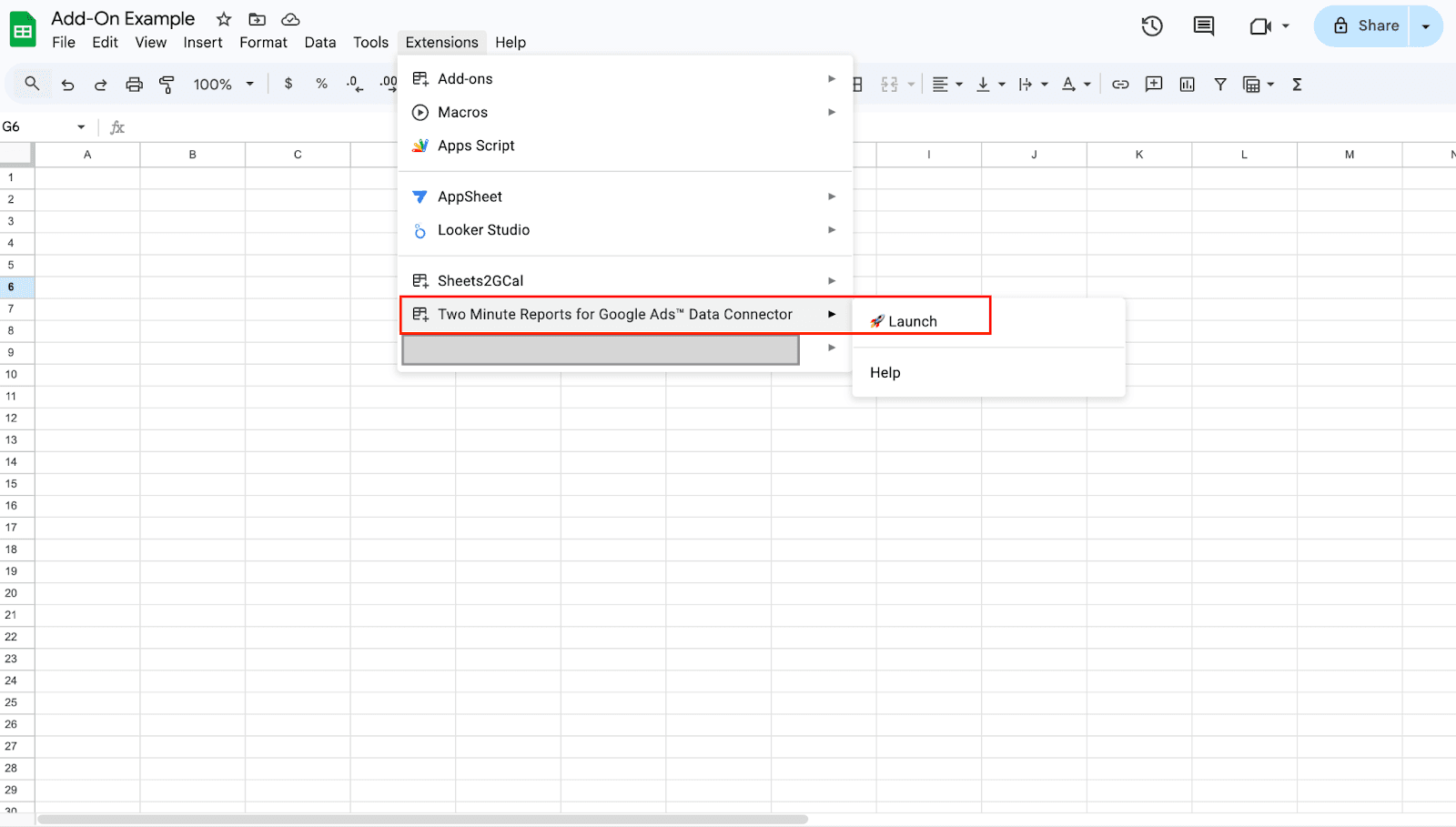
2. Click Extensions in the top menu
3. Select Add-ons → Get add-ons
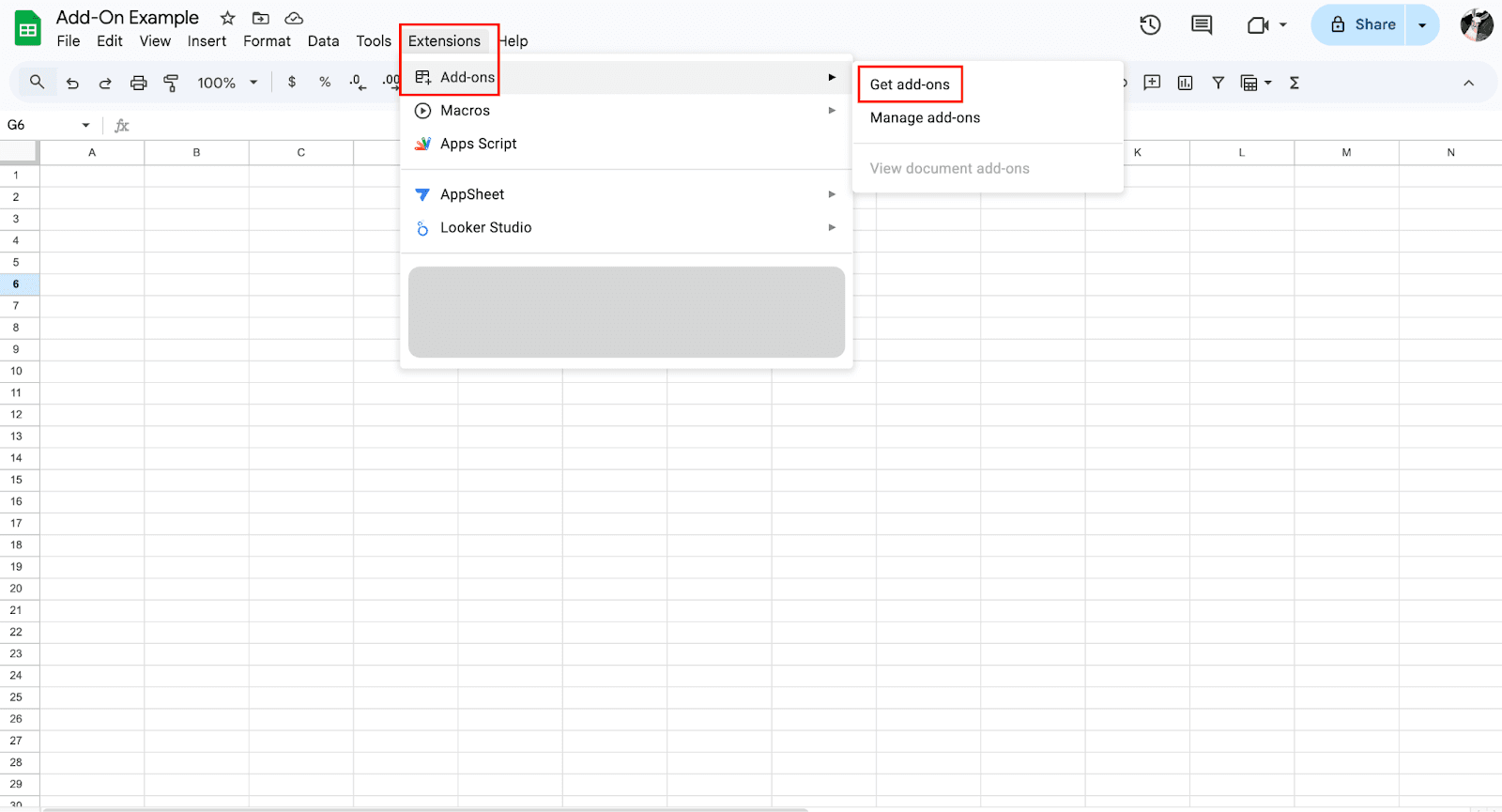
4. The Google Workspace Marketplace will open, and you will search for the add-on you want
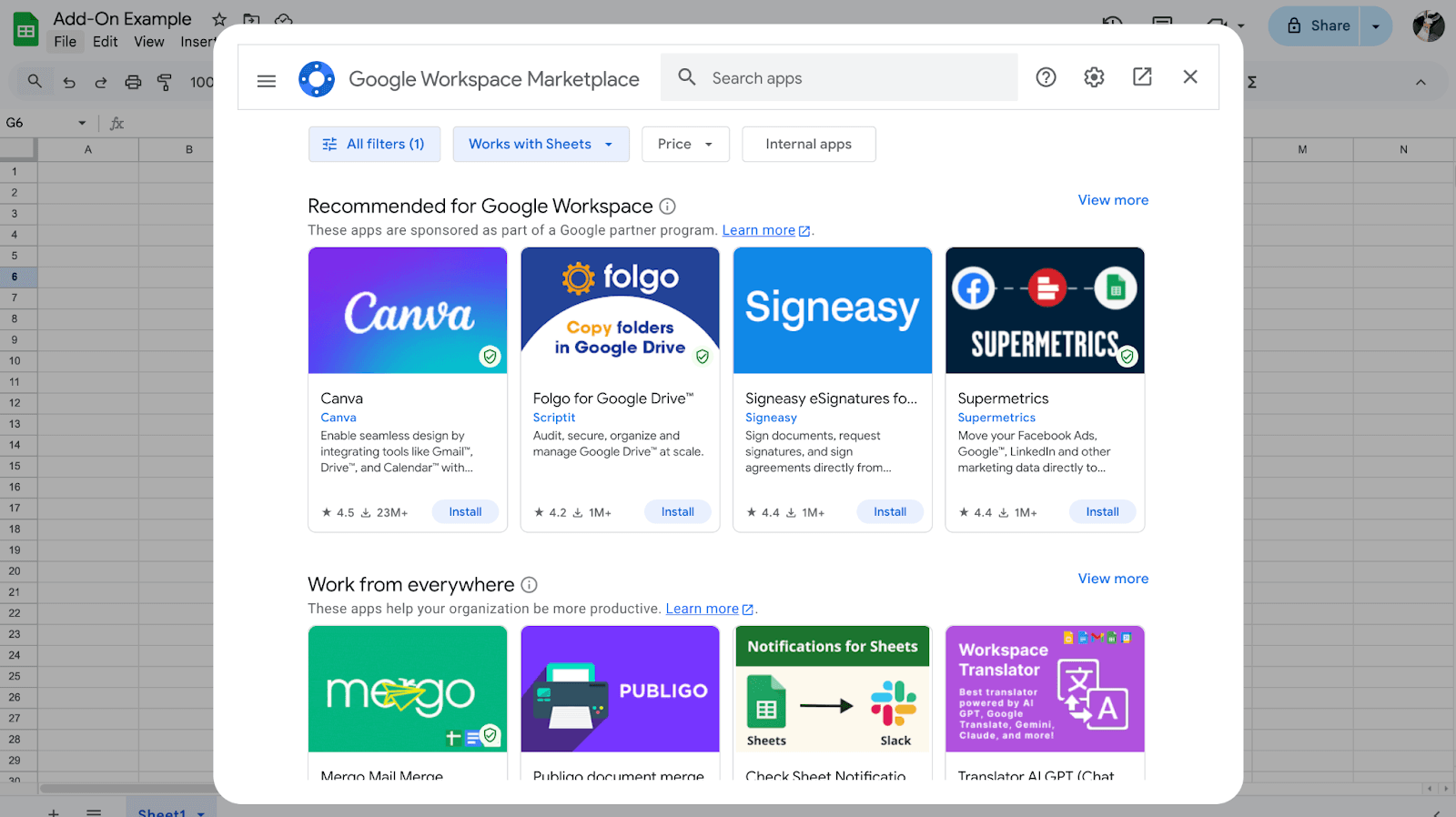
5. Click on it, then hit Install
6. Grant the required permissions and click Done
The add-on will now appear under your Extensions menu every time you open Sheets.
A few things to keep in mind before installing:
- Some add-ons are free, others require a paid plan to unlock full functionality
- Always review what permissions an add-on requests; some need access to your Google account data
- Add-ons are account-level, not file-level, so once installed, they're available across all your Sheets files
- If you're on a Google Workspace account (business), your admin may need to approve installations first
Quick Comparison: Google Sheets Add-Ons by Category
Before diving deeper, here’s a categorized comparison of all 15 Google Sheets add-ons. This overview helps you align each tool with your reporting, automation, outreach, or AI goals.
Best Google Sheets Add-Ons for Marketing & Business Reporting
Stop pulling data manually. These add-ons connect your marketing platforms directly to Google Sheets and keep your reports updated automatically.
1. Two Minute Reports
Two Minute Reports is built for teams that manually export CSVs from Meta Ads, copy Google Analytics numbers into a spreadsheet, and format everything before a client call.
Two Minute Reports connects to 30+ marketing platforms, including Google Ads, Facebook Ads, GA4, LinkedIn Ads, TikTok, and Shopify, and pulls the latest data directly into Google Sheets and Looker Studio automatically. No exports. No copy-pasting.
Where Two Minute Reports stands out against heavier tools is simplicity and cost. You get automated dashboards, scheduled refreshes, and white-label reporting without the enterprise price tag or a steep learning curve. Get your hands on it by installing it directly from Google Workspace Marketplace.
What it does:
- Pulls data from 30+ advertising, analytics, and ecommerce platforms into Google Sheets, including Google Ads, Facebook Ads, GA4, TikTok Ads, LinkedIn, and Shopify
- Schedules automatic data refreshes, hourly, daily, or weekly, so dashboards stay current without manual updates

 Source: Google Workspace Marketplace Reviews
- Builds white-label, client-ready reports with custom branding, logos, and formatting
- Loads dashboards up to 5x faster on large datasets with built-in Speedboost technology
- Blends data from multiple platforms into a single unified view for cross-channel ROI reporting
- Compares performance across accounts, campaigns, ad groups, and ad levels in one place
- Get real-time alerts when a query fails and resolve them immediately.
Pros:
- No-code setup, up and running in minutes
- Affordable entry point
- 100+ free and customizable marketing dashboards
- 24/6 customer support to answer your queries
Limitations:
- No freemium plan
- AI chatbot in pipeline
2. Supermetrics


Supermetrics is one of the most established names in marketing data pipelines. It connects platforms like Google Analytics, Google Ads, Facebook, and HubSpot and transfers data into destinations like Google Sheets, Looker Studio, Excel, or Power BI, automatically, without manual exports.
What it does:
- Pulls data from platforms like Facebook Ads, Google Ads, LinkedIn, TikTok, HubSpot, and Shopify into Google Sheets and other destinations
- Schedules automated data refreshes, weekly on lower plans, daily or hourly on higher tiers
- Supports custom dashboards and advanced data transformations
- Connects to data warehouses like BigQuery and Snowflake on Enterprise plans
Pros:
- Deep connector library covering 150+ marketing and sales platforms
- Strong fit for teams already using Looker Studio or Power BI alongside Sheets
- 14-day free trial available
Limitations:
- The starter plan allows only one user and weekly data refreshes. Daily or hourly updates require a higher tier, which significantly increases costs
- Starter and Growth plans include only one destination. Adding Google Sheets alongside Looker Studio, for example, requires upgrading
- No built-in white-label reporting or client management tools
- Pricing varies by region, adding unpredictability for global teams

 Source: Google Workspace Marketplace Reviews
TMR vs Supermetrics: The right choice depends on your team size and budget. For a full breakdown of features, pricing, and use cases, read our dedicated Two Minute Reports vs Supermetrics comparison guide.
Best Google Sheets Add-Ons for Workflow & Automation
These add-ons remove the manual work between spreadsheets. Connect files, automate data transfers, and let your workflows run on schedule.
3. Form Mule


Form Mule is built for teams that need emails to go out automatically without anyone pressing send. Form Mule sends targeted, personalized emails from a Google Sheet, either via a manual merge or a triggered merge that fires automatically on form submission or on a schedule
What it does:
- Triggers personalized emails automatically on Google Form submission or on a timer
- Supports multiple email templates with conditional send rules per sheet
- Works natively inside Google Sheets with no third-party platform required
- Generates unique case numbers on form submission for tracking follow-ups
- Converts spreadsheet data into formatted HTML tables for use inside email bodies
Pros:
- Free to use for basic email automation
- Simple conditional logic without needing code
- Strong fit for internal workflows and form-triggered notifications
- Lightweight and easy to set up
Limitations:
- Not suited for large-scale outreach campaigns
- Lacks advanced tracking, like open rates or click tracking
- No dedicated support on the free plan
4. Yet Another Mail Merge


Yet Another Mail Merge (YAMM) is the most widely used mail-merge add-on in the Google ecosystem. Where Form Mule handles internal triggers and notifications, YAMM is built for outbound volume, sending personalized campaigns to hundreds of contacts at once, tracked in real time directly inside your spreadsheet.
What it does:
- Personalizes subject lines, email body, links, images, and attachments per recipient using column data from Google Sheets
- Tracks opens, clicks, replies, bounces, and unsubscribes in real time from the spreadsheet
- Schedules campaigns to send at a specific time
- Sends follow-ups to targeted segments, such as contacts who did not open the first email
- Integrates with Salesforce, HubSpot, and Copper for CRM-connected outreach
Pros:
- Familiar Gmail interface with no learning curve
- Real-time tracking is visible directly in the spreadsheet
- Free plan available for low-volume sends
- Strong deliverability compared to bulk email platforms
Limitations:
- Daily send limits restrict larger campaigns
- Not ideal for enterprise-scale outreach
- Campaign stats are stored per spreadsheet, which makes it hard to manage across multiple campaigns
Best Google Sheets Add-Ons for Data Cleanup & Formatting
Messy data slows everything down. These add-ons handle the cleanup so your team spends less time fixing spreadsheets and more time using them.
5. Power Tools
Power Tools covers everything from removing duplicates and merging tables to splitting text, trimming whitespace, comparing sheets, and running advanced find and replace. It tackles over 300 use cases, making it one of the most versatile add-ons in the Google Workspace Marketplace. Instead of hunting through menus or writing formulas for every cleanup task, Power Tools puts 40+ tools in one place and lets you run them in a few clicks.
What it does:
- Finds and removes duplicate rows across sheets
- Compares two sheets for matches and differences
- Splits and merges cells, columns, and text strings
- Cleans up whitespace, inconsistent formatting, and empty rows in bulk
- Runs advanced find and replace with regex support
- Group tools into a smart toolbar for one-click access to your most used actions
Pros:
- 40+ tools covering the most common data cleanup tasks
- No formula knowledge required for most actions
- Saves and shares sets of options for repeated tasks
- Passed an independent security assessment
- 30-day fully functional free trial
Limitations:
- The sheer number of tools has a learning curve for new users
- Navigation inside the add-on requires a few clicks to reach specific tools
- Some advanced features overlap with what Google Sheets already does natively
6. Copy Down


Copy Down solves a very specific but frustrating problem. It takes the formulas and formatting from row 2 of your sheet and automatically copies them into every new row added by a form submission. This means calculated fields, VLOOKUP references, conditional formats, and data validation rules all stay intact as new data comes in.
What it does:
- Auto-copies formulas and cell formatting into new Google Form submission rows
- Supports subtotals, VLOOKUP, conditional formatting, and data validation on dynamic datasets
- Works alongside Form Mule and autoCrat for form-triggered workflows
Pros:
- Free to install and use
- Saves significant manual effort on form-driven sheets
- Works with complex formula types, including VLOOKUP and conditional formatting
Limitations:
- Not compatible with spreadsheet filters on the form response sheet
- Limited to form submission rows, not useful for manually added data
- Very narrow use case compared to other add-ons in this category
7. ChangeCase
ChangeCase deals with inconsistent text formatting across a dataset, names in all caps, product titles in lowercase, or mixed case entries pulled from external sources. It adds a simple menu to Google Sheets that lets you select any range and convert it to your preferred case format instantly.
What it does:
- Converts text to uppercase, lowercase, title case, sentence case, and more
- Works on any selected range across your sheet
- Removes the need for formulas like UPPER, LOWER, or PROPER
Pros:
- Completely free to use
- No formula knowledge required
- Fast and straightforward for any team member to use
Limitations:
- Single-purpose tool with no broader data cleanup capabilities
- Does not handle other formatting inconsistencies beyond text case
- No batch processing across multiple sheets at once
8. Table Styles


Table Styles comes with 50+ pre-designed templates across six categories. You can apply a full style or selectively borrow just the font, fill color, borders, or alignment from any template. You can also build and save your own custom styles to reuse across any spreadsheet.
What it does:
- Applies 50+ pre-built table styles to any selected range instantly
- Let's you apply full styles or individual formatting elements selectively
- Allows you to create, save, and reuse custom style templates
- Previews style changes before applying them
Pros:
- Significant time saver for teams producing recurring reports
- Custom style builder for brand consistency
- Works across any spreadsheet without setup
Limitations:
- Focused purely on formatting, not data management
- Style options may feel limited for teams with very specific branding needs
- Paid plan required to unlock all templates and custom style saving
Best Google Sheets Add-Ons for Visualization & Data Presentation
Raw data inside a spreadsheet only tells part of the story. These add-ons turn your Google Sheets data into interactive views, diagrams, and visual formats that are easier to share, explore, and act on.
9. Awesome Table


Awesome Table works across two core products. The add-on inside Google Sheets handles data imports from external sources. The app creation tool at app.awesome-table.com handles how that data gets displayed and shared publicly or internally.
What it does:
- Converts Google Sheets data into interactive views, including tables, cards, maps, Gantt charts, catalogs, directories, and FAQs
- Adds dynamic filters and full-text search so viewers can explore data without spreadsheet access
- Embeds interactive views into any website, Google Sites, SharePoint, Confluence, or intranet
- Imports data from 40+ sources, including HubSpot, Salesforce, Zendesk, Stripe, and BigQuery, directly into Sheets
- Supports custom branding and styling with HTML, CSS, and JavaScript for teams that need deeper customization
Pros:
- No coding required for standard views and templates
- Data updates automatically from Google Sheets without rebuilding the app
- Strong embed options across a wide range of platforms
- Ready-to-use templates for common use cases like directories and catalogs
- Free plan available to get started
Limitations:
- Google Sheets is the only supported data source for the app display tool, which limits flexibility
- Real-time sync requires a manual refresh in some cases
- Large datasets with thousands of rows can slow down performance
- Deeper design customization requires CSS and JavaScript knowledge
- Not a replacement for full business intelligence tools like Tableau or Power BI
10. Lucidchart


Lucidchart bridges the gap between raw spreadsheet data and visual clarity. It works as a sidebar add-on inside Google Sheets. You create or edit diagrams in the Lucidchart editor and insert them directly into your spreadsheet as embedded visuals. It also links to live spreadsheet data, meaning diagrams like org charts and process flows can update automatically as your underlying data changes.
What it does:
- Creates flowcharts, org charts, ERDs, UML diagrams, wireframes, mind maps, and network diagrams
- Embeds diagrams directly inside Google Sheets alongside your data
- Links diagrams to live Google Sheets data, so visuals update as data changes
- Supports real-time collaboration with simultaneous editing, commenting, and version history
- Exports diagrams as PDF, PNG, SVG, and CSV for sharing with stakeholders
- Integrates with Google Workspace, Slack, Jira, Confluence, and Microsoft Teams
Pros:
- Extensive template library covering almost every diagram type
- Real-time collaboration built in, no extra setup needed
- Data-linked diagrams reduce manual updating
- Free plan available to get started
- Trusted by major enterprises including Google, GE, and T-Mobile
Limitations:
- Lucidchart does not convert existing spreadsheet data into diagrams automatically — you still build the diagram yourself and link it to the data
- The permissions list required during installation is extensive, which raises concerns for some users and IT administrators
- Free plan is limited to three editable documents and 60 shapes per document
- Performance can slow down on very complex diagrams with many linked elements
Best Google Sheets Add-Ons for Outreach & Lead Generation
Getting responses starts with delivering the right message to the right person. These add-ons handle the heavy lifting of personalization, bulk sending, and lead sourcing directly from Google Sheets.
11. Mail Merge with Attachments


Mail Merge with Attachments pulls the right file from Google Drive and attaches it to the right email automatically. It works directly from Google Sheets using your Gmail account and Gmail drafts as email templates. This keeps the setup familiar and sends emails through Gmail servers, which can improve inbox placement compared to third-party platforms.
What it does:
- Sends personalized bulk emails with unique attachments per recipient, pulled from Google Drive
- Uses Gmail drafts as email templates, with full formatting, images, signatures, and CC or BCC support
- Tracks opens, clicks, and replies in real time directly inside the Google Sheet
- Schedules sends and handles invalid email addresses automatically
- Supports filters so only visible rows are processed, giving you control over who receives each campaign
Pros:
- Unique per-recipient attachments, which most mail merge tools do not support natively
- Familiar Gmail and Google Sheets interface
- Real-time tracking is visible directly in the spreadsheet
- Step-by-step wizard makes setup intuitive for non-technical users
Limitations:
- Free plan is limited to 25 email recipients per day, which is very restrictive
- Some users have reported billing and auto-renewal issues, worth reviewing before committing to a paid plan
- Not suited for large-scale campaigns beyond Gmail send limits
- No built-in unsubscribe management on the free tier
12. Hunter


Hunter works on a simple premise. Give it a domain name or a person's name and company, and it returns a verified email address along with a confidence score showing how reliable that address is. Inside Google Sheets, this means you can take a raw list of prospect names and company domains and enrich it with verified contact emails in minutes.
What it does:
- Finds professional email addresses from a company domain or a person's name and company directly inside Google Sheets
- Verifies email deliverability in bulk with actionable confidence scores to reduce bounce rates
- Runs bulk searches and verifications across entire columns of prospect data at once
- Filters contacts by department, seniority, and location for more targeted outreach
- Integrates with CRMs, including Salesforce, HubSpot, Pipedrive, and Zoho for seamless pipeline building
Pros:
- Free add-on with no extra installation cost beyond a Hunter account
- Bulk enrichment saves hours of manual research on large prospect lists
- Confidence scores help prioritize outreach to the most reliable contacts
- Clean, straightforward interface with almost no learning curve
- Unlimited team members on every paid plan
Limitations:
- Email finder success rate varies between 35% and 45%, depending on the region, with stronger coverage in the US and Europe than in Asia or Latin America
- Monthly credits expire at the end of each billing cycle, meaning unused searches are lost
- Free plan is limited to 25 searches and 50 verifications per month, which runs out quickly for active prospecting
- No phone number lookup or LinkedIn data enrichment natively
Best Google Sheets Add-Ons for Text & Content Analysis
When your data is text, standard spreadsheet tools fall short. These add-ons bring natural language processing and AI directly into Google Sheets so you can analyze feedback, reviews, and survey responses at scale.
13. Text Analytics
Text Analytics, powered by text2data.com, is built for teams sitting on large volumes of unstructured text with no efficient way to make sense of it. Survey responses, customer reviews, support tickets, and social media comments all contain valuable signals. Text Analytics surfaces those signals automatically using AI and machine learning, without requiring any technical setup.
Text Analytics works as a sidebar add-on inside Google Sheets. Select a column of text, run the analysis, and the add-on returns sentiment scores, extracted keywords, categories, and entity tags directly into adjacent columns in your sheet.
What it does:
- Runs sentiment analysis on text data and classifies each entry as positive, negative, or neutral with a confidence score
- Extracts keywords, themes, and named entities from large text datasets automatically
- Categorizes documents into auto-generated or custom user-defined categories
- Runs AI analysis powered by ChatGPT for deeper, configurable text insights
- Exports results and generates detailed reports compatible with Power BI and Tableau
Pros:
- No coding or NLP knowledge required
- Handles bulk analysis across large datasets in one run
- Custom classification models let you train the tool on your own categories
- Supports English, French, German, and Spanish for sentiment analysis
- Around 90% accuracy on sentiment classification
Limitations:
- Free tier has significant limitations, and some users report that it does not function reliably inside Google Sheets
- Paid plans start at $83 per month, making it expensive for occasional use
- Daily transaction limits apply even on paid plans
- Not well-suited for very short or highly informal text like casual social media comments
Best AI-Powered Google Sheets Add-Ons
AI is rapidly transforming how teams use spreadsheets. Instead of manually writing complex formulas or categorizing thousands of rows, AI-powered add-ons now automate analysis, content generation, and data classification directly inside Google Sheets. Here are two of the most powerful AI add-ons built specifically for Sheets.
14. GPT for Sheets & Docs


GPT for Sheets and Docs is the most widely used AI add-on in the Google Workspace Marketplace, with over 7 million installs. GPT for Sheets and Docs removes the technical barrier between non-technical users and complex spreadsheet automation. Instead of writing formulas or scripts, you describe what you want in plain language, and the add-on handles the rest across thousands of rows at once.
What it does:
- Runs bulk AI prompts across up to 200,000 rows in a single run, at up to 400 prompts per minute
- Generates, fixes, and explains complex formulas using plain language descriptions
- Classifies and categorizes large datasets automatically
- Translates text in bulk across multiple languages
- Summarizes survey responses, reviews, and feedback at scale
- Supports multiple AI models, including ChatGPT, Claude, Gemini, Perplexity, Grok, and Mistral, so you can choose based on speed, quality, or cost
- Pulls live web data directly into your spreadsheet via built-in web search
Pros:
- 7 million installs, one of the most trusted add-ons in the Marketplace
- Flexible AI model selection, not locked into one provider
- ISO 27001 certified and GDPR compliant
- No API key required to get started
- Handles enterprise-scale datasets reliably
Limitations:
- Performance can slow down on very large runs without a paid plan
- Some users report a learning curve when setting up more complex bulk prompts
- Costs can add up for teams running high volumes of prompts without their own API key
- Navigation inside the sidebar takes some getting used to for new users
15. Numerous.ai
Numerous.ai is designed for teams that want to bring ChatGPT into their spreadsheet workflow without dealing with API keys, complex setups, or developer resources. Numerous.ai keeps things simple. Install the add-on, type a formula, and the AI does the work across as many rows as you need.
Where GPT for Sheets and Docs focuses on bulk agent-driven workflows, Numerous.ai leans toward ease of use and accessibility, making it a strong entry point for marketers, content teams, and small business owners who are new to AI-powered spreadsheet automation.
What it does:
- Uses simple in-cell functions like =AI(), =WRITE(), and =INFER() to run prompts directly inside Google Sheets
- Generates marketing copy, product descriptions, taglines, and email content at scale
- Cleans and normalizes inconsistent data by showing the AI a few examples and letting it infer the pattern across the rest of the dataset
- Categorizes large datasets, including survey responses, reviews, and product inventories
- Generates and explains complex formulas from plain English descriptions
- Summarizes long-form text, including articles, messages, and support tickets
Pros:
- No API key required, straightforward flat-fee pricing
- Extremely low learning curve, accessible to non-technical users
- INFER function is a standout feature for pattern-based data cleaning and categorization
- Works across Google Sheets and Excel
- Tokens never expire, unused credits carry over
Limitations:
- Free tier is very limited, and users hit the paywall quickly
- Not suited for very high-volume enterprise workflows compared to GPT for Sheets and Docs
- Some users report intermittent errors, including broken functions and installation issues, when using multiple Google accounts
- Customer support response times can be slow on lower-tier plans
How to Choose the Right Google Sheets Add-On for Your Business
With 15 options across six categories, the right choice comes down to one question: what is slowing your team down the most right now?
Work through these six considerations before installing anything.
What problem are you solving?
Start here. If your issue is manual data exports and reporting, you need a tool like Two Minute Reports or Supermetrics. If your issue is messy data, start with Power Tools or ChangeCase. If you need to send personalized emails at scale, YAMM or Mail Merge with Attachments will serve you.
Do you need automation or reporting?
These are different needs. Automation tools like Sheetgo, Form Mule, and Copy Down handle recurring processes and data movement. Reporting tools like Two Minute Reports pull live platform data and build dashboards. Some teams need both, but knowing which is the priority helps narrow the list fast.
How often does the data refresh?
If your reporting needs to update hourly or daily, make sure the add-on supports that refresh frequency on the plan you can afford. Some tools, like Supermetrics, lock daily or hourly refresh behind higher tiers. Two Minute Reports includes automated scheduling across all plans.
Team size and collaboration needs
Solo users and small teams can get significant value from free or low-cost plans. Larger teams need to check whether the add-on supports multiple users, shared workflows, and permission controls before committing.
Budget considerations
Most add-ons offer a free tier or trial, but costs scale quickly with usage, seats, and data volume. Establish a monthly budget before evaluating tools so you are comparing like for like. A tool priced at $9 per month for one user can become $90 per month for a team of ten.
Security requirements
If your business handles sensitive data, check whether the add-on is GDPR compliant, SOC 2 certified, or has passed an independent security assessment before installing. Always review the permissions an add-on requests during installation.
Emerging Google Sheets Add-On Trends in 2026
Google Sheets is no longer just a spreadsheet tool. Here is what is shaping the next generation of add-ons.
AI-powered formula generators are replacing manual formula writing.
Tools like GPT for Sheets and Numerous.ai have made this mainstream. Instead of learning syntax or debugging nested formulas, users describe what they need in plain English, and the AI handles the rest. Expect this to become standard across most add-ons rather than a standalone feature.
Predictive analytics is moving inside the spreadsheet.
Forecasting and trend analysis no longer require a dedicated BI tool. Add-ons are bringing regression analysis, trend forecasting, and anomaly detection directly into Sheets, making predictive insights accessible to teams without a data science background.
No-code automation builders are becoming the default.
Tools like Sheetgo and Form Mule already let non-technical users build multi-step workflows inside Sheets. The next wave will go further, with visual workflow builders that rival dedicated platforms like Zapier or Make.
Data privacy is becoming a buying criterion, not an afterthought.
GDPR compliance, SOC 2 certification, and transparent permission models are no longer nice to have. They are a baseline expectation, especially for enterprise and regulated industries.
Cross-platform reporting integrations are getting deeper.
Teams need a unified view across paid, organic, social, and eCommerce data in one place. Add-ons like Two Minute Reports are leading this shift with 30+ platform connectors and built-in data blending.
Final Thoughts
Google Sheets is already powerful. With the right add-ons, it becomes the operational backbone of your entire workflow, handling everything from live marketing dashboards and automated reporting to bulk outreach, data cleanup, and AI-assisted analysis.
The productivity gains are real. Teams that previously spent hours on manual exports, repetitive formatting, and copy-pasting between tools get that time back. The work does not disappear; it just stops requiring a human to do it.
The best way to start is not to install everything at once. Pick two or three tools that map directly to your biggest workflow pain point right now. If reporting is the bottleneck, start with Two Minute Reports. If data cleanup is eating your time, Power Tools and ChangeCase will make an immediate difference. If outreach is the priority, YAMM or Mail Merge with Attachments are worth trying today.
Frequently Asked Questions
Most add-ons go through a Google Marketplace review before being listed. Always check the permissions requested, read the developer's privacy policy, and stick to providers with a large install base and strong user reviews.
They can, especially add-ons that run in the background or process large datasets. Only keep add-ons you actively use installed, and disable any running automatically if you notice slowdowns.
Yes. Tools like Two Minute Reports, Sheetgo, and YAMM support scheduled triggers that refresh data, transfer files, or send emails automatically without any manual input.
Add-ons are installed from the Google Workspace Marketplace and work inside the spreadsheet. Chrome extensions are installed through the browser and modify your browsing experience. They are separate tools that serve different purposes.
Many have a free tier or trial, but most useful features sit behind a paid plan. Free tiers are typically limited by rows processed, emails sent, or accounts connected. Always verify what the free plan includes before building a workflow around it.
Two Minute Reports. It connects to 30+ platforms, pulls live data into Google Sheets, and keeps dashboards updated automatically. Built specifically for marketers and agencies, with a 14-day free trial and no credit card required.
Related Blogs




Meet the Author
Shabika VenkidachalamShabika, at her core, is a storyteller who believes even data-heavy topics can be infused with heart. At Two Minute Reports, she blends creative writing with user intent to create clear, purposeful content that is deeply human. Away from her desk, she finds inspiration in nature, where creativity flourishes without distractions.